
Development preview / Explore the approach. See what’s available
The BE360 home inspection dashboard

Your inspection business.
One connected workspace.

Scheduling, clients, referrals, marketing, automation, and money belong in one operational conversation. BE360 grew around everything between “inspection booked” and “check cleared.”

Discuss an inspection walkthrough
Inside the home inspection dashboard

See the workspace.
Recognize your work.

Original BE360 interface captures from the earlier site. Explore the views that bring inspection operations into focus.

Command Center / Development capture
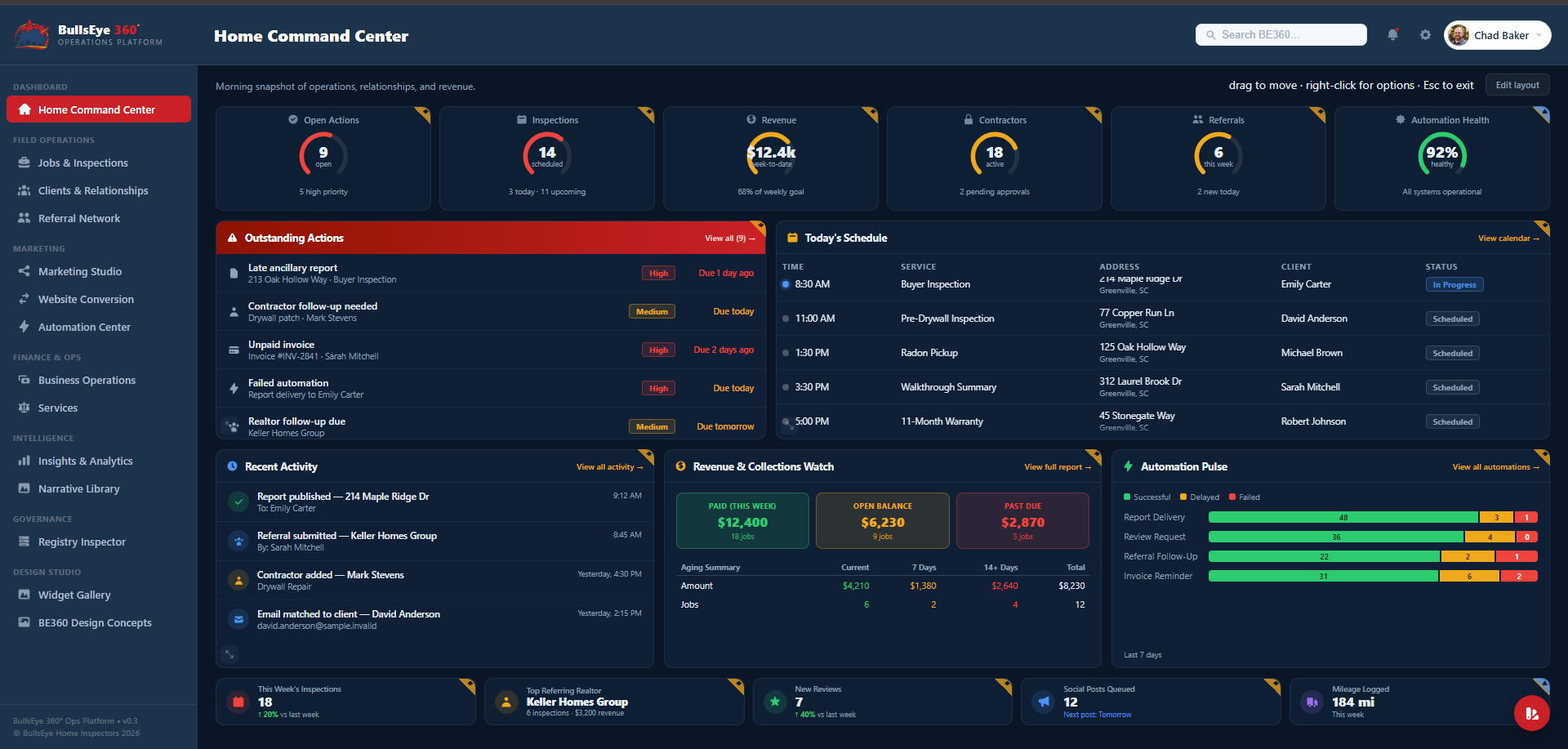
BE360 Home Command Center with action priorities, inspection schedule, recent activity, revenue and collections, and automation panels
Start with the whole picture.The Home Command Center brings the day's schedule, outstanding actions, revenue watch, and automation pulse into one view.
  • Priorities beside the day's appointments
  • Collections and recent activity in context
  • A shared home for focused workspaces

Development screenshots restored from the original site, which presented them as sample-data previews. They include simulated and mixed-readiness features. Visible figures, dates, statuses, and provider names are part of the capture, not current operating results or integration guarantees.

Command Center

BE360 Home Command Center with action priorities, inspection schedule, recent activity, revenue and collections, and automation panels
1 of 5

Original development capture · Includes simulated features. Press Escape to close.

An illustrative inspection lifecycle

The job ends.
The relationship continues.

A shared view of the work helps each handoff keep its context. The sequence below describes a design goal, not a connected demonstration.

  1. 01

    Before the visit

    Schedule the inspection, define the services, and make agreements and preparation visible.

  2. 02

    At the job

    Keep the main inspection, ancillary work, and contractor handoffs in context.

  3. 03

    After delivery

    Review completion, collections, client follow-up, and referral next steps.

  4. 04

    Across the business

    Use the patterns in those records to guide marketing, resources, and priorities.

Explore the operations platform

The detail behind the daily work.

Explore the workspaces around an inspection business. Each area is a development direction to evaluate; these lists do not promise current availability or live integrations.

01 / The daily overview

Home Command Center

A morning view of the decisions, appointments, and follow-ups that need your attention.

Discuss this capability

The question this workspace should answer

What needs my attention before the first appointment?

  • Open actions with priorities, owners, and due dates
  • Inspection schedule alongside revenue and collections
  • Referral activity and automation health in context
Workflow scope to explore · Readiness varies
02 / Field operations

Jobs & Inspections

Follow the work from appointment through report delivery, with ancillary services beside the main job.

Discuss this capability

The question this workspace should answer

Is everything ready for this inspection to move forward?

  • Pending and completed inspections with report status
  • Radon, termite, mold, well water, septic, and pool service tracking
  • Job checklists for agreements, folders, delivery, and vendor handoffs
Workflow scope to explore · Readiness varies
03 / Relationships

Clients & Relationships

Keep the person, the job, and the next conversation connected.

Discuss this capability

The question this workspace should answer

Who needs a follow-up, and what should we know first?

  • Client and job context, stage, balance, and next action
  • Engagement history across calls, messages, and referrals
  • Email matching, contact intake, and personalized reminder queues to evaluate
Workflow scope to explore · Readiness varies
04 / Relationships

Referral Network

Give the relationships behind your business a useful operational home.

Discuss this capability

The question this workspace should answer

Which relationships need attention after the job is finished?

  • Referral sources, partner activity, and next steps
  • BNI activity and thank-you-for-closed-business tracking
  • Contractor specialties and recommendations associated with jobs
Workflow scope to explore · Readiness varies
05 / Growth

Marketing Studio

Connect your brand, content, and relationship-building activity to the work you already do.

Discuss this capability

The question this workspace should answer

What is ready to share, and who needs to approve it?

  • Brand kit for logos, colors, and messaging
  • Content queues, review steps, and publishing schedules to scope
  • Growth activities and reusable realtor, lender, and homebuyer assets
Workflow scope to explore · Readiness varies
06 / Connected work

Automation Center

Make repetitive handoffs visible, including the ones that need a person to intervene.

Discuss this capability

The question this workspace should answer

What ran, what failed, and what should happen next?

  • Workflow stages from inspection intake to follow-up and collections
  • Connection status, action history, and failure visibility
  • Report delivery, review requests, and reminders assessed individually
Workflow scope to explore · Readiness varies
07 / Finance & resources

Business Operations

Bring the back office into the same conversation as the field work.

Discuss this capability

The question this workspace should answer

Where are time, resources, and outstanding balances accumulating?

  • Equipment, supplies, reorder needs, and labor availability
  • Costs, mileage, and export requirements
  • Revenue, balances, aging, and staged collections follow-up
Workflow scope to explore · Readiness varies
08 / Finance & resources

Services

Define the services your business delivers and the rules that make each one different.

Discuss this capability

The question this workspace should answer

What does this service include, and how should it be scheduled?

  • Public-facing and internal service catalogs
  • Pricing and duration rules for each service
  • Re-inspections, warranty work, add-ons, and booking requirements
Workflow scope to explore · Readiness varies
09 / Business intelligence

Insights & Analytics

Look beyond activity counts to the questions that guide a business decision.

Discuss this capability

The question this workspace should answer

What is working, and which underlying records explain it?

  • Referral partner contribution and relationship health
  • Campaign, outreach, and booking-conversion questions
  • Automation reliability and source freshness
Workflow scope to explore · Readiness varies
10 / Inspection knowledge

Narrative Library

Organize report language around the defects, trades, and review decisions inspectors encounter.

Discuss this capability

The question this workspace should answer

Is the language clear, appropriate, and associated with the right trade?

  • Structural, electrical, plumbing, HVAC, and roofing categories
  • Recommended trade mapping and narrative review
  • Localization requirements and links to report workflows
Workflow scope to explore · Readiness varies
11 / Your public presence

Website Conversion

Plan a move from a legacy website into a maintained site with a clear view of what must carry across.

Discuss this capability

The question this workspace should answer

What must survive the move, and how will we verify it?

  • Side-by-side content and page comparisons
  • Navigation, assets, forms, and integration inventories
  • Content transfer, review, and an explicitly approved cutover
Workflow scope to explore · Readiness varies
From one truck to a growing team

Different businesses. Different starting points.

Solo inspectors

Start with the work that follows you home: follow-ups, ancillary tracking, collections, and tomorrow’s appointments. Define one useful improvement first.

Multi-inspector firms

Explore shared scheduling, responsibilities, referral pipelines, and collections visibility. Shape each view around the people responsible for the work.

Schools & training partners

Discuss teaching workflows, practice environments, and the operational habits new inspectors need. Education packages and licensing would be agreed separately.

BE360° AI Advisor

Assistance where the work happens.

The product direction places assistance in the context of the record and the decision: preparing follow-ups, reviewing possible matches, and drawing attention to work that needs review.

Keep the person in control.

For each proposed capability, define the information it can access, the action it can suggest, and what requires human approval. The website does not provide a live AI advisor.

Connect the tools that make sense.

Reporting and scheduling tools, email, cloud folders, your website, CRM, and social channels are integration categories to assess. Actual connections depend on provider access, permissions, implementation, and verification.

Explore the custom development approach
The maturity ladder

Software you can evaluate, stage by stage.

Readiness should be visible and understandable. This model gives a useful vocabulary for asking what a component actually does today.

  1. 01

    Illustrated

    An appearance or concept. No working behavior is implied.

  2. 02

    Simulated

    Local example behavior, using synthetic data.

  3. 03

    Mock

    A defined connection backed by a replaceable mock provider.

  4. 04

    Partial

    Some behavior is connected; remaining gaps must be named.

  5. 05

    Operational

    The specified workflow has been validated with its intended services.

These are model definitions, not a current rating of every BE360 component. A status applies to the demonstrated scope; request evidence for the workflow you intend to use.

Understand the development preview
Let’s build something useful

Start with the work you wish was easier.

Bring the spreadsheet, the handoff, the workaround. We’ll talk through what a better workflow could look like.

Tell us what you’re building